Quick Start Guide
This guide will help you integrate Warp Router into your solver or relayer in minutes. By the end, you’ll understand how to execute fill and claim operations, manage solver contexts, and optimize for gas efficiency.Prerequisites
Before you begin, ensure you have:Solidity ^0.8.28 development environment
Basic understanding of delegatecall patterns
Familiarity with either TheCompact or Permit2 protocols
Installation
1
Install dependencies
Add Warp Router to your project dependencies:
2
Import the Router interface
Import the Router interface in your contract:
3
Connect to the Router
Initialize the Router in your contract:
Understanding Solver Context
The solver context is a critical component that allows you to pass settlement-specific data to adapters. Each adapter defines its own context format.Solver Context Format
When the Router calls an adapter, it appends the solver context using: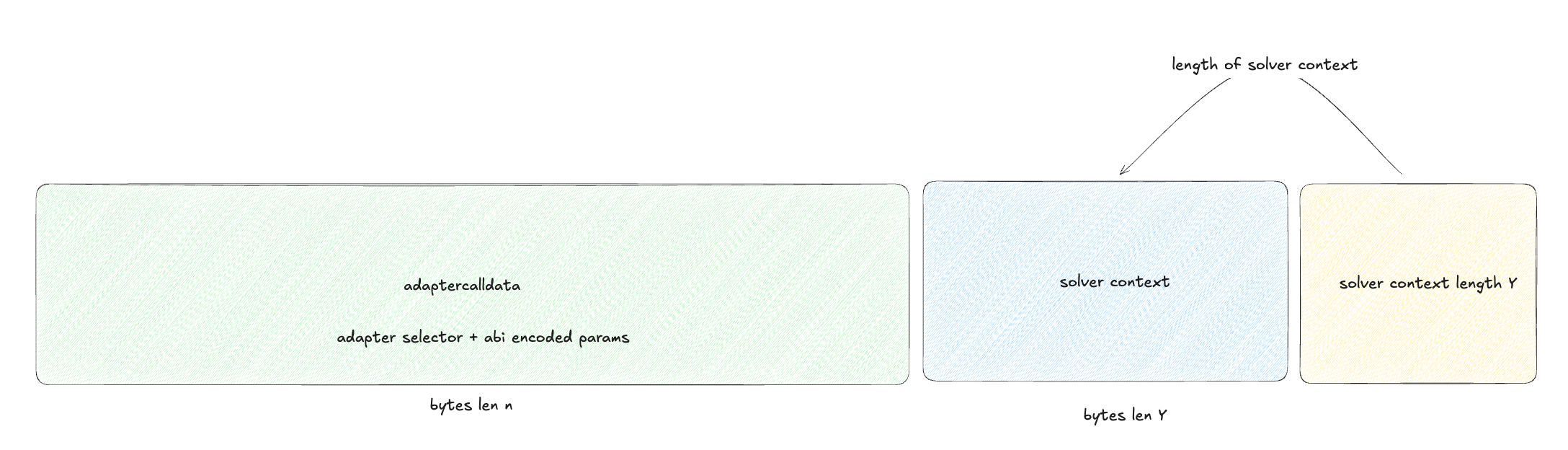
Example: SameChainAdapter Context
The SameChainAdapter expects the simplest possible context - just the recipient address for input tokens:src/arbiters/samechain/SameChainAdapter.sol
Executing Fill Operations
Fill operations are the core of settlement execution. Here’s how to execute them:Standard Fill Route
1
Prepare adapter calldata
Encode your fill operation with the 4-byte function selector:
2
Prepare solver context
Create your solver context with settlement-specific data:
3
Execute the fill
Call the router to execute the fill:
Complete Fill Example
Executing Batch Fills (Optimized)
For gas-optimized batch operations, use theoptimized_routeFill921336808 function:
1
Prepare multiple adapter calldatas
Create an array of adapter calldatas for your batch:
2
Encode and hash the batch
Encode the array and compute its hash:
3
Get atomic signature
Obtain a signature from the atomic signer:
4
Prepare solver contexts
Create context for each operation:
5
Execute optimized batch
Call the optimized fill function:
The optimized batch function provides significant gas savings through adapter caching and reduced calldata overhead. Use it for all multi-operation batches.
Executing Claim Operations
Claim operations unlock user resources from protocols. Unlike fills, they don’t require atomic signatures:Single Claim
Batch Claims
Claim operations rely on protocol-level authorization (TheCompact or Permit2 signatures) rather than atomic Router signatures.
Gas Optimization Tips
Batch Similar Operations
Group operations using the same adapter to leverage caching. Each cache hit saves approximately 2,100 gas.
Use Optimized Routes
The
optimized_routeFill921336808 function provides significant gas savings through efficient encoding and caching.Special Selectors
Use built-in selectors like
singleCall and multiCall when possible to avoid adapter overhead (saves 2,600+ gas).Minimize Context Size
Keep solver context as small as possible to reduce calldata costs, especially for batch operations.
Working with Same-Chain Settlements
Same-chain settlements follow a specific 3-step pattern:1
Pre-funding
Solver pre-funds the recipient with output tokens before claiming input tokens:
src/arbiters/samechain/SameChainAdapter.sol
Pre-funding prevents order manipulation attacks where malicious actors could front-run settlements.
2
Resource unlock
Arbiter validates signatures and unlocks user’s input resources:
3
Completion
The arbiter transfers input tokens to the solver’s designated recipient, completing the atomic swap.
Security Considerations
For Solvers
Signature Requirements
Signature Requirements
Fill operations require valid atomic signatures from the Router’s designated atomic signer. Never attempt to bypass signature validation.
Context Validation
Context Validation
Ensure your solver context matches the adapter’s expected format. Incorrect encoding will cause reverts and wasted gas.
Batch Atomicity
Batch Atomicity
All operations in a batch succeed or revert together. Design your batches carefully to avoid partial execution scenarios.
Gas Limits
Gas Limits
Account for pre-claim operation gas stipends when estimating total gas costs. Pre-claim operations receive dedicated gas allocations.
Common Patterns
Pattern 1: Simple Token Swap
Pattern 2: Batch Operations with Same Adapter
Next Steps
Architecture Guide
Dive deep into the Router, Adapter, and Arbiter layers
API Reference
Explore the complete API documentation
Advanced Patterns
Learn advanced integration patterns and optimizations
Protocol Adapters
Explore available protocol adapters and their capabilities